
So why are multiple heads evil, and why do we want to stop hg from pushing them to another repo. Well, usually multiple heads are caused by failed merge attempts (avoiding merges). Pushing multiple heads in this situation will postpone the need of merging (it will be needed eventually), or make somebody else merge the heads. If a programmer intends to make a new head in the first place - he is likely to create a new branch.
Another reason do want to push multiple head changesets are auto build/test frameworks. If the execute hg incoming and suddenly see 3 heads instead of one. Surely they'll fail to carry on their routine.
I believe I've mentioned something about mercurial hooks and some of their applications. These hooks may be used to disallow pushing changesets with more than one head. We don't have to implement this hook by ourselves, a good implementation is available at hg.pythong.org.
mkdir ~/hooks && cd ~/hooks
wget http://hg.python.org/hooks/archive/fc6022656a7b.tar.gz -O hooks.tar.gz
tar zxf hooks.tar.gz && mv hooks-fc6022656a7b/* .
Now we need to edit, the ~/.hgrc file.
[hooks]
pretxnchangegroup.checkheads = python:/home/kr/hooks/checkheads.py:hook
Let's see how it works:
~ $ ~/prj/python/bw $ hg push
pushing to /home/kr/repos/bw
searching for changes
abort: push creates new remote head 4ffea01f3220!
(did you forget to merge? use push -f to force)
This was to be expected, by default mercurial required the -f switch to push a changeset containing multiple heads.
~ $ hg push -f
pushing to /home/kr/repos/bw
searching for changes
adding changesets
adding manifests
adding file changes
added 1 changesets with 1 changes to 1 files (+1 heads)
* You are trying to create new head(s) on 'default'!
* Please run "hg pull" and then merge at least two of:
* c96b37d67e47, 4ffea01f3220
transaction abort!
rollback completed
abort: pretxnchangegroup.checkheads hook failed
This hook gives +10 to keeping your repo tidy!
Cheers!
KR
P.S.
There are some more hooks in the downloaded archive, feel free to check them out.
Showing posts with label mercurial. Show all posts
Showing posts with label mercurial. Show all posts
Wednesday, December 12, 2012

Monday, October 15, 2012
Renaming Mercurial branches
I believe there is no need to present Mercurial (since You got here, You should be familiar with it anyway). I'd like to present a way of renaming / replacing branches. By default, without using extensions, it's impossible ("branches are permanent and global...")... but there are other ways to deal with it. Let us suppose we want to rename branch A to B. We can achieve it the following way:
hg update A
last_head=$(hg id -i)
hg ci -m "close A" --close-branch
hg update $last_head
hg branch B
hg ci -m "branche renamed to B"
This is it, now our branch is named B. In practice we just closed branched A and created a new branch B from the last commit. This activity may be visualized the following way:
 Replacing an existing branch with another is a bit more tricky, here's what you have to do:
hg update A
hg ci -m "close A" --close-branch
hg update B
hg branch A -f #force, branch A exists
hg ci "rename to A"
#optional close branch B
The general idea may be presented the following way:
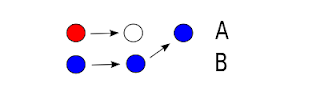
In order to create a branch that previously existed we have to use the force switch (hg branch). Nothing should go wrong if the previous head of branch A was closed, else You'll just end up creating another head.
Experimenting with hg is cool, just remember - before You try anything experimental, commit your work! This may save You a lot of nerves.
Cheers!
~KR
hg update A
last_head=$(hg id -i)
hg ci -m "close A" --close-branch
hg update $last_head
hg branch B
hg ci -m "branche renamed to B"
This is it, now our branch is named B. In practice we just closed branched A and created a new branch B from the last commit. This activity may be visualized the following way:

hg update A
hg ci -m "close A" --close-branch
hg update B
hg branch A -f #force, branch A exists
hg ci "rename to A"
#optional close branch B
The general idea may be presented the following way:

In order to create a branch that previously existed we have to use the force switch (hg branch). Nothing should go wrong if the previous head of branch A was closed, else You'll just end up creating another head.
Experimenting with hg is cool, just remember - before You try anything experimental, commit your work! This may save You a lot of nerves.
Cheers!
~KR
Subscribe to:
Posts (Atom)
